How many of us honestly started out in life intending to do a doctorate? Like many of us, I have to admit that I kind of ended up doing mine because a) somebody said I could have a place to do it; b) it seemed like a good way of avoiding the corporate career path without having to actually say so; and c) I’d get to spend some quality time finding out about Victorian funerals (although you might wish to insert your own topic here!) However we get here, though, there comes the point where we do finally have to face the question of what are we going to do with the rest of our lives post-doctorate.
For some doctoral graduates an academic career seems the obvious choice, while others are keeping an open mind – or are maybe thoroughly sick of academia and longing to get out there into the ‘real world.’ However even for those who’re intent on an academic career, the reality is that the jobs market is tougher than ever – so it’s still sensible to keep your options open and be prepared.
This week we ran our Future Directions course, the underlying theme of which was “challenging assumptions” about what doctoral graduates can go on to do careers-wise. In the morning Dr Tilly Line from the UWE Careers service talked about the reasons why doctoral graduates might go into non-academic careers, and the huge range of sectors and industries where their very special, high-level problem-solving, research and analytical skills are much sought after by employers. Tilly particularly tackled the common assumption that taking up a non-academic career represents some kind of failure – in fact over 50% of doctoral graduates are nowadays employed elsewhere so, if anything, it’s the norm!
In the second half of the workshop, we used the Vitae Researcher Development Framework (RDF) for a spot of personal action planning. This is a useful tool for any researcher, whether or not they’re planning to stay in academia, to start developing some vocabulary for the kind of skills, behaviours and attributes they’ve gained through doing their research degree. Of course it can also be used to identify areas for further development, so to finish with we had a go at setting some S.M.A.R.T. (Specific, Measurable, Achievable, Realitic, Timebound) goals that the participants would take forward in order to develop their knowledge/skills in a particular area of the Framework.
Yesterday we ran our “The effective researcher – the middle years” workshop. This is aimed at PGRs who, having expended considerable time and energy passing Progression, are now experiencing the dreaded “second year slump” – when progress seems elusive, perspective fails, and you lie awake at 3am wondering why the h*ll are you doing this, will someone remind me please.
After introductions, we dug back into our memories of how it was in the beginning – the heady mixture of euphoria, excitement, fear of the unknown, new responsibilities but also new freedoms. Building reading stamina and developing one’s academic voice also came up. We spent quite a lot of time doing this, but I think it was worthwhile: judging from the smiles and nods, some of us at least were already beginning to recollect “why” we had ever embarked on this doctoral journey.
We then thought ahead to the final stages of the research degree, and this was a good opportunity to talk about the academic, procedural and also the emotional experience of submission, viva and post-viva.
Btw here are the slides, with due acknowledgement to Vitae for some of the materials:
Then we used some metaphors as a way of talking about “middle years” of a doctorate: juggling balls and spinning plates proved especially popular, and the mountaineering analogy also spoke to a lot of us. PGRs are a hugely diverse bunch, but it’s amazing how much common ground there actually is, and the relief of finding out that “it’s normal” and “you’re not alone” was palpable.
In the afternoon we discussed practical ‘strategies for success’ – defining the project scope and standards (with reference to the doctoral descriptor), having a system for organising your material, avoiding procrastination, finding and protecting writing time, and acknowledging the changing relationship with supervisors. Above all, being kind to yourself and finding a working routine that suits you. We finished off with some personal action planning.
As always with these events, there was huge value in just taking some time out to reflect on achievements so far, meet others in a similar position and identify some practical ways of keeping the momentum going. Very best of luck to all the participants with the next stages, and hope to see you again soon!
In December the UWE Researchers’ Forum tackled a topic at the heart of a successful academic research career, that of how to write papers that are considered to be internationally excellent or even world leading. What we try to do with these events is to help early career researchers to understand what factors are involved in a successful academic research career. We do this by inviting experienced researchers to share their knowledge, expertise and practice. Here’s the programme for the forum.
In the morning we invited two UWE academics who have a lot of experience of writing, reviewing and encouraging others to write excellent research outputs.
The video camera was still rolling so here’s what Professor Williams had to say.
The afternoon of this Researchers’ Forum then sought to explore how researchers could use digital tools to augment their excellent outputs of research to help extend their reach. I’ve written about some of these things in a post the “Digital Researcher” and there’ll be a separate post featuring the video.
This week at UWE we welcomed Dave Jarman, the Head of Enterprise Education at the University of Bristol to facilitate a session on creativity in research. Here’s some thoughts from Dave about how important creativity is in the business of research.
The Creative Researcher session explores the basic principles of creative and innovative thought and their importance for researchers. As researchers and as products of traditional education programmes we often prize critical and analytical thought very highly – but the ability to suspend critical thought is integral to generating creative thoughts from which truly innovative applications can arise. Too often we seek the ‘right answer’ which usually leads us exactly where everyone else has gone before – if we’re trying to find something original we have to look where others do not.
As a result creativity involves a different approach; partially an internal one – giving yourself permission to make mistakes, to explore the ridiculous, to follow your curiosity down possible dead-ends, and to stretch yourself into ‘uncomfortable’ and unfamiliar territories. But the external environment also has an impact; creativity thrives in resource-rich and diverse networks. You need stimulation, connections, and an environment conducive to exploration to generate creative ideas and experiment with them.
This week I contributed to a “learning lunch” for colleagues here at UWE. The topic for this episode is authentic leadership. It’s a re-run of a leadership insight I delivered a couple of years back on a course entitled “Leadership in Action”. This is a Vitae course offered to researchers (both students and staff) to allow them the time/freedom/space to practice leadership in a variety of settings. This particular course was one sponsored by the South West & Wales regional hub of Vitae.
This week we ran a workshop to introduce the changes to the process of submitting a doctoral thesis at UWE. From September 2013, all doctoral candidates are required to submit an electronic version of their final thesis alongside a hard bound copy. The context of this is to make it easier for anyone to access the research outputs from universities – the open access agenda which I wrote about here.
We invited the managers of the UWE Research Repository, Alex Clarke and Anna Lawson to explain a bit more about how the repository came about and how to deposit a thesis. Here are their supporting slides.
At the beginning of July, Plymouth University in collaboration with UWE, Bristol put on a four day residential course for doctoral researchers at the fabulous Buckland Hall in the Brecon Beacons. This course is designed to give researchers the time and space to reflect on their development to date and to spend time in the company of other researchers thinking about where their research might take them. The overall theme of the course was “Building a reputation as a researcher”. Running through the programme were several topics that underpin this; communication of research, collaboration with others and understanding what drives you as a researcher.
Here is an outline programme that gives a flavour of what we were doing.
A big part of the success of this event is the venue itself, it really does make a difference to how the participants react. An interesting venue historically, Buckland Hall is now operated as a retreat/wedding venue. What’s great about it is that with groups the size that we have (36 researchers and a team of around 8 staff) you get exclusive use. The staff are brilliant achieving the seemingly impossible balance between being terribly efficient, catering for all your needs yet being almost out of sight the entire stay. As a course organiser I can’t tell you how valuable that is! The other feature of this venue is the ethos, the place runs on trust – trust bar, no room keys, treat the place as your own etc. and the organic vegetarian cuisine.
This slideshow requires JavaScript.
Having the right venue is one thing but you have to come up with a programme that is right for your participants. We’ve a lot of experience running these type of courses (since 2003 in fact) and many of them have been based on the renowned Vitae GRADSchool model.
Over the past few years we have been hacking the format in part because of the diverse nature of our participants who on average tend to be older, international and from a wide range of disciplines. A further success factor in a course like this is a good balance of facilitators who understand doctoral researchers and their research.
Course team L-R Julia Crocker, Chris Russell, Helen Frisby, Mandy Burns, Neil Willey and Sarah Kearns
Introduction
The majority of the participants on this course arrived on the coach that we laid on (from Plymouth via Bristol). No sooner than they had arrived then they were faced with me introducing them to the next four days. Here’s that slideshow.
Like most courses you go on, the majority of your fellow participants are not known to you so inevitably there is a need to spend some time ingratiating yourself with others. We achieved this by doing three basic things; 1) running an icebreaker (building a giraffe), 2) establishing ‘home’ groups and 3) running an interview workshop.
Monday
How to build a giraffe!
Day 1 summary
The idea behind the interview workshop, given the demographic of the participants, was to run it as a familiarisation of each others research exercise rather than a full on “this is how you perform at interviews”. I think that this worked, some folks certainly appreciated the chance to practice talking about their research and others found it fascinating to observe others being interviewed.
Day 2. Connecting with others
There were three main things covered on the second day, some grounding principles in communicating research (start with why), establishing buddy pairs and the collaboration challenge.
Day 2
Day 2 summary
I started out the day by showing a short TED talk by Steven Addis. The take home message from this wasn’t about photography but rather to become aware of how our perspectives on things change over time and that we should be proactive in thinking about where it takes us.
I then spoke about communicating research and the need to be clear about the “why” of your research, that it is important to be able to make your work accessible and that the easiest way to do that was to use stories. Simon Sinek featured heavily in my presentation because I think his model of communication works just as well for academic researchers. Here’s the slides I used to support this session:
Along with focussing on the why I also made the assertion that “Storytelling is everything“. A video that helps convey that is by Scott Berkun who is talking about a fast paced presentation format called “Ignite” (a derivative of Pecha Kucha).
The afternoon session was facilitated by Neil Willey who is an experienced researcher who has and is working on a number of large collaborative research projects. Participants used the statements they generated in the morning to propose a research project involving multiple discplines.
Day 3. Motivations and communicating in an accessible way
There was a change of pace on the third day of the course to something more introspective. It was known that tackling the subject of motivations and values is risky which presents a difficulty in how to pitch it to a diverse audience. For me it was important to explore for the following reasons; reconnecting with your motivation to follow a research path is beneficial during a doctorate when things aren’t going so well, it is also good to understand “what feeds your soul” when thinking about future career choices. I also believe that it is good to recognise why you do what you do (helps the communication thing!).
We spent some time introducing the concept of Social Enterprise to set up the session on the final day. This dovetails neatly with the exploration of motivations and values and also opens up a horizon for researchers that they may not have considered before. Here’s a few resources that cover what I had to say.
Facts and figures about social enterprise in the UK
The concept of social entrepreneurship – tackling challenges across the globe
Why social enterprise makes sense.
The 2 minute thesis
In the afternoon we changed gear and Sarah Kearns handed the groups a video camera with only one instruction: Go away and draft, rehearse and record your thesis in a 2 minute presentation.
This session is aimed at raising awareness of social enterprise, a different way of doing business, for researchers. It is a case study that I, with the help of two colleagues Paul Toombs and Janet Wilkinson, authored back in 2010 and made available nationally through Vitae. The thinking behind this is that there are many attributes shared by social entrepreneurs and researchers; both are passionate problem solvers, both are motivated by making a difference, both are extremely resilient to challenges and hurdles. I used the following slides to introduce the session.
I’m obviously not the only one because there are others who want folks to challenge the conception that powerpoint presentations are inherently dull and boring affairs. Probably the best known example of this is a presentation format known as Pecha Kucha.
This is a fast paced format where the speaker is given 20 slides that automatically advance every 20 seconds that creates a maximum presentation length of 6 minutes and 40 seconds. Originally devised by architects Astrid Klein and Mark Dytham as a way of encouraging architects to stick to the point, it has become a global sensation. It has spawned a number of other similar formats, e.g. Ignite, all of which put a focus on telling an interesting story but just quickly.
I have never prepared and delivered a Pecha Kucha before so when asked recently to deliver one at the South West & Wales Vitae Good Practice Event, I thought I had better practice what I preached. I survived and wanted to share my experience of the challenges involved in preparing a pecha kucha.
Challenge #1. Pronunciation
One of the first things I learned is that I have been saying pecha kucha incorrectly! Looking at the spelling, my Western brain interprets the two words as having four syllables of equal length leading to one to pronounce it:
Peh – Cha; Koo- cha
However it is a Japanese term for “chit chat” and native speakers pronounce it rather differently; more like three syllables with an emphasis on the middle syllable.
Pe – Chak – cha
The best presentations are stories that get folks emotionally involved. This statement doesn’t often sit well with researchers with their caveats and verbose explanations of detailed investigation but really it is. I even spotted an article in a blog of the well respected academic journal Nature talking about this very point. So regardless of the topic, you have to think “what’s the story?” and regale it with some enthusiasm.
If we have a look at an example Ignite talk (20 slides advancing every 15 seconds!) by Scott Berkun, he says everything I want to about storytelling…
Challenge #3. Storyboarding
If you look at a few examples of pecha kucha, you’ll notice that the slides are mostly pictures. But before you go off hunting for gorgeous photos from around the internet…stop…and think. What are my key points I want to make? How am I going to turn that into a story?
Plan it out using a good ol’ pencil and paper – think about the ebb and flow of your story. Only then will you be in the right place to go looking for the pictures that act as an aid to your story. Remember, storytelling is everything.
Challenge #4. Timing
The slides automatically advance. This is scary because you feel a loss of control and that tends to make people speed up. So, remember you will probably lose your first and last slides to a variety of things – so condense down the message to its absolute key points. Why are you passionate, why should I care, how will this change things. There is also a temptation to keep looking at the slides to see when they change to the next one, often resulting in you pausing as it transitions. I think one should try to keep your story flowing and let the slides carry on – it’ll work out just fine!
Challenge #5. Imagery
It takes longer than you think to track down photo images that are the right fit. Things you need to consider are:-
don’t rip off someone else’s copyrighted material – sure go to Flickr and browse but use the advanced search to find images that allow for re-use (a creative commons licence)
You can buy royalty-free photos from a number of websites (e.g. iStockPhoto – this is where I buy many of mine from) – A little trick here is that these sites often offer a free photo of the week (worth knowing if you are building up a collection)
Use your own photos! Get out your camera and snap away – then there is no issue with copyright
Draw your own pictures either using software and importing it into your powerpoint or on paper then photographing as above. This can be a brilliant way of creating a story. See this example by Matt Harding (Where the Hell is Matt?)
Challenge #6. Rehearse. No really!
You do have to rehearse to check that you can tell your story in the time available – really you do!
So there are some hints and tips to be going on with. Have you had to give a pecha kucha? Can you share any tips?
The following is a guest post from Janet Wilkinson (Three Times Three) on the topic of putting together a business plan for the uninitiated.
Inevitably there is no single answer to the question ‘what do I need to include in my business plan and how long should it be?’ and a Google search on the two words business plan suggested that there are about 1,640,000,000 results.
The key here is not the number it is the word ‘about’. A business plan is:
About the thing you are going to develop – your idea, your organisation, services you will provide, products you will make or sell and the names/brand you are going to give them. The origin of the idea and ownership of any intellectual property to the idea or product need to be covered in the plan too.
Aboutyou and the other people who are going to work to be able to deliver the project, idea or enterprise. This is crucial to demonstrate your experience, expertise and ability to engage others in the plan.
Aboutthe finances for the business: what money is required for the idea to be developed initially and where is it going to come from? How will money flow into the organisation and when? What will you have to spend money on and when will you have to spend it? Is there a gap between the money flowing in and the money flowing out (and who will cover this)? How much risk is there in developing the idea (now and in the future) and who is taking this risk?
“Would you tell me, please, which way I ought to go from here?” said Alice
“That depends a good deal on where you want to get to” said the Cat.
“I don’t much care where….” Said Alice
“Then it doesn’t matter which way you go” said the Cat.
Alice in Wonderland, Lewis Carroll
Ultimately, business plans are about direction. One of the main purposes of having one is to communicate your intentions to the outside world (where you need to include them). They are for communication to anyone who is investing in the project or organisation, lending money to it, funding it or is responsible for delivering the goals or results for it. Overall, though, I’ve always felt that it is the process of business planning that is the output rather than the document itself. The time taken to plan what you are doing is invaluable and the decisions you make about your intentions and how the logistics, finances and people involved are going to make it happen are all part of the business planning process.
Similarly, understanding how the money is going to flow in and out of the organisation to make sure you have enough to do what you want to do in the coming years and sustain your idea development is a crucial part of the process. When I came across the following quote a few years ago it helped to set my practical understanding and experience in some context.
In preparing for battle I have always found that plans are useless, but planning is indispensable.
Dwight D. Eisenhower
So, does it need to be 200 pages or will it work on the back of an envelope? Inevitably the answer is somewhere in between and it depends upon the audience who will receive and read your plan. Keep the content and size of your plans appropriate to the size of the organisation or idea, think about who is going to receive them and keep them realistic (particularly the numbers) with threads of ambition, drive and future focus throughout – thinking about how the idea and organisation will be sustained beyond the lifetime of the plan.
Also, think about how you are going to communicate the plan to others – will you be sending it to them to read or presenting it in person? Regardless of the size of your idea it is useful to think about how you’d summarise it in 2-3 pages and/or 20 slides. Putting this kind of framework on your business plan enables you to concisely to explain your plan, purpose, people, product and finances to others.
Typically you will want to cover:
The title or name of your idea
What your idea or organisation is about
The people who will be making it happen and their areas of expertise in relation to the idea and/or running the organisation
The people who will be users, consumers or customers of the idea (and how you are going to reach them)
What might exist already in the environment you plan to operate it (and whether these are competitors or potential collaborators)
What the longer term plans are for your idea or organisation
How much money do you need to get started (and where will it come from)
How will the money flow in and out of the organisation in the next 1, 3 or 5 years?
How much money you are likely to need in the future for expansion or development of your idea and where will it come from.
As with all writing and plans it is important to start somewhere. Business plans can be put together initially from your areas of strength working towards the ‘unknowns’ where further research and information gathering can be done. So, start on the back of an envelope even if it needs to be 200 pages in the end!
About two years ago I started my blogging journey, I wanted a way to reflect on the workshops I deliver to researchers – to jot down the context, share the resources used. I’m a reasonably confident and competent tech user but had no clue about blogging platforms. This is why I chose posterous.com as my starting place because it was pretty simple to use allowing me to focus on writing content rather than worrying about templates or html or css editors…
I have already made the jump from posterous to wordpress in August of last year – I know many folks will be thinking about doing the same so I thought I’d share my experience of doing so.
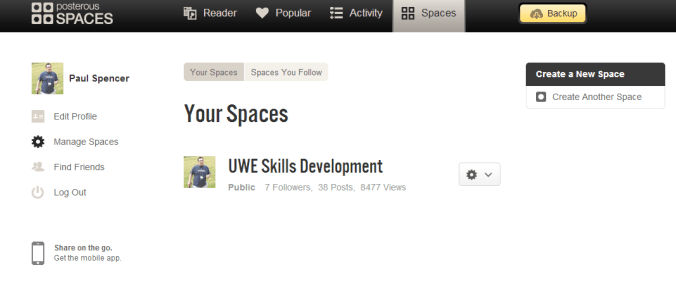
The first step is to export the content of your Posterous blog – you can do this right from your “manage spaces” panel in posterous by clicking on the “backup” button – see below
This could take a while but eventually you’ll get a zipped archive of your blog.
The next step is then to take it to another blogging platform, in this case I am talking about wordpress but before I carry on it’s important to stress the difference between wordpress.org and wordpress.com. The former is an open source website architecture that relies on you having your own webspace and domain name whereas the latter is both a website template AND a hosting space combined. If, like me, you want to keep things as simple as it was with posterous then a wordpress.com blog is what you’ll probably prefer!
WordPress.com offer a free blogging solution – this allows you to store upto 3GB of data (text, images etc) and gives you freedom to call your blog anything you like with the suffix .wordpress.com. For most folks this will be adequate. You can customise the theme of your blog with a diverse range of templates etc.
I chose to pay a fee for my new blog – thedigitaldoctorate.com – it cost $99 per year. This gives me an extra 10GB storage, makes my blog advert free and allows a few extra bells and whistles (like having a .com url).
Once signed up then importing your archive from posterous is easy, you use a dedicated import tool right from the control panel (dashboard) of your new blog; it will transfer across all your text entries, comments and hyperlinks. The official advice on this is easy and straightforward to follow http://en.support.wordpress.com/import/import-from-posterous/
Things I’ve learned
1) The embedded documents that you had in posterous won’t have come across in the import – you may have a hyperlink to the document which takes you back to the posterous blog (which won’t be there in May…!). This creates a headache for folks like me who tend to embed powerpoints/word docs/pdfs into all my posts. There’s no easy way to say this but you have to find all the original files and do one of two things–
(i) Upload those files to a 3rd party document store e.g. scribd – you can upload many files at once using the desktop uploader (handy!). The advantage of using scribd (or similar) is that you can edit the attributes of the file in terms of what folks can do with it (e.g. disable download/printing). Having your documents here is also handy for connecting up to LinkedIn etc – promotes your professional stuff across a number of platforms. Scribd also have a wordpress.com specific embed shortcode which makes it easier to embed docs into your posts. The downside is that this is a two step process and a serious pain in the arse if you have a couple of hundred files to upload and then re-embed into individual posts.
(ii) You can upload the files directly into your wordpress “media library”, this is easy enough to do and here is the guidance on that http://en.support.wordpress.com/uploading-documents/. Only note of caution here is that this could eat into your data allowance if you have many large powerpoints/pdfs, especially if you have the free blog which is capped to 3GB.
2) It is a pain in the rear to embed prezis into a wordpress.com blog (as opposed to a wordpress.org site). This is because WordPress.com does not support iframes because of security concerns. There is a workaround which involves taking the embed code from your prezi and editing it to work with wordpress.com. I hated this. There are a couple of simple web apps out there that can do that bit for you.
Update:
The following shortcode generators have stopped working correctly for new and recently edited prezis. The end result is that you can embed the prezi but it will not load. Hopefully enough folks will have complained about this for either Prezi or WordPress.com (or both) to find a solution to this.
Simply copy the url of the prezi you want to embed, paste into the generator and click ‘shortcode?’ Then you copy the long string, paste into your blog – et voila problem solved.
3) Uploading photos into your media library is a cinch and it is easy to create a slick slideshow in your posts. Here’s the support page, it’s a piece of cake! http://en.support.wordpress.com/images/gallery/
4) Embedding youtube videos is also really easy – I find the easiest way is to simply grab the url of the video and click the add media (from url) button in the editing pane – paste in url and click insert into post. This works for most media types at the end of a url.
5) TED videos have a special wordpress embed shortcode – really easy!
There’s a few tips to be getting on with – if I think of anymore then I’ll update!
 What do you want to be when you grow up?





 The Digital Doctorate